
The PUBG gaming community has been active since 2017. But the real issue for the new PC players to join this community is the PUBG system requirements. Young players are mostly playing PUBG on their mobile phones, but they are willing to upgrade their gameplay to a larger screen. So, before you download or purchase, you must know PUBG minimum system requirements and PUBG recommended system requirements. If you are also a Grand Theft Auto lover, you can find GTA 5 system requirements here.
PUBG System Requirements Overview
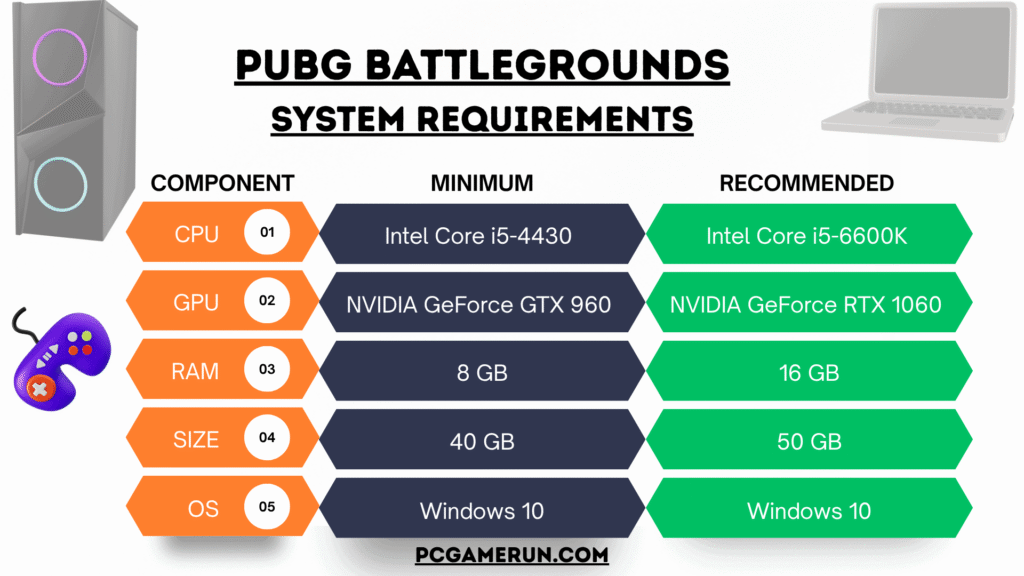
If your PC meets the minimum PUBG system requirements, that means you can go ahead. The CPU must be a minimum of i5 with 4th generation, with 8 GB of DDR3 or DDR4 RAM, and a single RAM is perfect. If we talk about a gaming card or a graphics processing unit, there are 2 minimum GPU options for both AMD and NVIDIA. AMD Radeon R7 370 and NVIDIA GeForce GTX 960 are the minimum requirements for a GPU of 2GB.
Similarly, the CPU needs to meet the minimum requirements of AMD FX 6300 and Intel Core i5 4430. It means there is no need to buy an expensive gaming PC for this game. Only a medium-range PC is enough to play it. But keep in mind that these are the lowest needs, so the performance of the gameplay will be normal.
PUBG Recommended System Requirements
These are the key system requirements that will deliver an outstanding gameplay to the PC players. But this PC will be expensive compared to the minimum needs. Let’s start with the processor, which is AMD Ryzen 5 1600 for AMD computers or Intel Core i5 6600K. The RAM you need is 16GB in total, but if you have DDR4 with a single slot, it will be perfect.
AMD Radeon RX 580 and NVIDIA GeForce GTX 1060 with 3 GB of video memory are the recommended gaming cards for the PUBG game. The rest of the things are DirectX 11, 40 GB of free hard disk space, Windows 10 (64-bit) and a compatible sound card are also required. An SSD or NVMe is not mandatory, but it will definitely increase the overall performance. It means you can get up to 60 FPS or 90 FPS if your computer’s hardware meets the latest technology.
PUBG System Requirements – Minimum vs Recommended Specs
| Component | Minimum | Recommended |
|---|---|---|
| CPU | Intel Core i5-4430 | Intel Core i5-6600K |
| RAM | 8 GB | 16 GB |
| GPU | NVIDIA GeForce GTX 960 2GB | NVIDIA GeForce GTX 1060 3GB |
| Size | 40 GB | 50 GB (SSD) |
| DirectX | DirectX 11 | DirectX 11 |
| OS | Windows 10 (64-bit) | Windows 10 (64-bit) |
| Sound | DirectX Compatible | DirectX Compatible |
The above table is a complete collection of required hardware specs to play the PUBG game on a PC. Please keep in mind that gaming laptops can play this game as well, but it will cost more than a desktop PC. So it is good to go with a custom-built gaming PC. If we look at the history of system requirements, the developer has raised hardware specs during the last few years.
Can Your PC Run PUBG?
Can your PC run PUBG game? is the main query gamers are searching for. The one-line answer is yes if your PC meets the target recommended specs and no if it does not. The ultimate solution to the PUBG system requirements query is mentioned below. So, before building a custom PC or buying a fresh one, write down the recommended specs and get a PC according to this checklist.
- If we take a quick overview, Intel Core i5 6th generation, 16 GB of RAM, 50 GB of hard drive space, NVIDIA GTX 1060 (3 GB), Windows 10, DirectX 11 and a compatible sound card for Intel-based computers.
- A CPU of AMD Ryzen 5 1600, AMD Radeon RX 580 (3 GB) of GPU, 16 GB of DDR4 RAM, 50 GB of hard disk space, and a 64-bit OS for AMD computers.
How to Check Your PC Hardware Specs?
- Right-click on your My Computer Icon
- Select Properties
- Here you can see the basic details of Storage, Graphics Card, RAM and Processor
- If these specs meet the above details, go ahead and buy or download PUBG
- Note: These details will be the same on both Windows 10 and Windows 11