

Cyberpunk 2077 system requirements are divided into multiple tiers according to the graphics quality. So it depends on the computer hardware specs for which quality works for you. Ray Tracing On/Off is playing a major role in the output graphics quality. This is why the developer divided this game quality according to the RT configuration into minimum, recommended, high, and ultra graphics. Let’s make it easier for you and explain in more detail. For example, if your PC has an RTX 3080, you will get ultra-high definition graphics with ray tracing on. On the other hand, if you have an NVIDIA GTX 1060, you will get the lowest graphics during gameplay.
Cyberpunk 2077 System Requirements Overview
If we compare Cyberpunk 2077 with GTA 5 system requirements, Cyberpunk 2077 demands super-heavy hardware. But as we mentioned above, there are multiple layers for the Cyberpunk 2077 system requirements. So medium-range gaming computers can get up to 30 FPS, and the latest-generation computers can reach up to 60 FPS.
No doubt, this game was available in late 2020 but the developer is continuously updating its patches to provide outstanding gameplay to gamers. This is why it needs Intel Core i7 12th generation or AMD Ryzen 7 7800X3D to play in ultra graphics mode. If we talk about graphics processing units, AMD Radeon RX 5700 XT or NVIDIA GeForce RTX 2060 Super is key to the recommended system requirements.
Cyberpunk 2077 Minimum / Recommended System Requirements
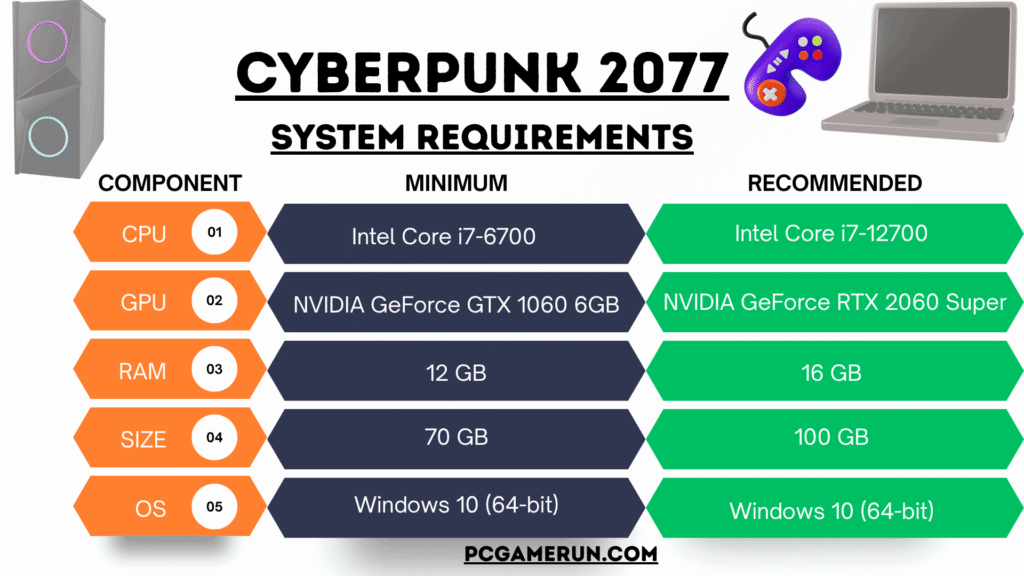
The total system requirements for Cyberpunk 2077 are available in 7 tiers. Three of them are set to Ray Tracing Off and the remaining 4 are set to Ray Tracing On. However, the comparison table gives ultimate control over PC specs. According to the Cyberpunk official requirement update, only one example of VRAM will be enough, which varies from 6 GB to 16 GB depending on the quality of graphics, from low to ultra. That said, we will never let you be confused. We made it easy for you and listed just 2 types of minimum and recommended system requirements below in the table.
| Component | Minimum | Recommended |
|---|---|---|
| CPU | Intel Core i7-6700 | Intel Core i7-12700 |
| RAM | 12 GB | 16 GB |
| GPU | NVIDIA GeForce GTX 1060 6GB | NVIDIA GeForce RTX 2060 Super |
| Size | 70 GB (SSD) | 70 GB (NVMe) |
| DirectX | DirectX 12 | DirectX 12 |
| OS | Windows 10 (64-bit) | Windows 10 (64-bit) |
| Sound | DirectX Compatible | DirectX Compatible |
Can Your PC Run Cyberpunk 2077?
It totally depends on the computer hardware specs and even the latest gaming PCs can play it with high resolution. The low-spec computers may lose shadows, lighting and similar visual effects. So it is mandatory to buy or upgrade your PC to meet the recommended system requirements.
In short, an Intel Core i7 12th gen, GeForce RTX 2060 Super, 16 GB of RAM, 70+ GB of disk space, and a Windows 10 PC can play it with recommended settings at 1080p. If you want more HD graphics with large screen rendering and effects, you will need an Intel Core i9 12th-generation processor with GeForce RTX 3080Ti (VRAM 12GB) or RTX 4080 (VRAM 16GB).
How to Check Hardware Specifications of a PC
You can quickly take a detailed look at the current hardware specifications of your PC in Windows 10 and Windows 11.
- Press Windows + R keys on the keyboard
- Type “dxdiag” in the run command and press Enter
- You will see “DirectX Diagnostic Tool” on your screen
- There will be multiple tabs like System, Display, Sound and Input